

You've reached the internet home of Chris Sells, who has a long history as a contributing member of the Windows developer community. He enjoys long walks on the beach and various computer technologies.
Monday, May 13, 2002, 7:35 AM in Tools
Modern C++ Design
From Razvan Caciula: I like Chris Sells's books, but also i like romanians too :> I'm preparing for a technical interview and i founded this book very useful.
Sunday, May 12, 2002, 1:09 PM
No matter the language, programming is fun!
Abandon all hope, ye who enter.
One program that is runnable in Perl, C, Befunge and BrainF*ck along with the general purpose techniques to use for your own such projects (as if!).
Ouch. My brain *still* hurts...
Sunday, May 12, 2002, 1:26 AM
HowTo: Write a Self-Installing Service
Craig Andera has provided a sample of how to write a self-installing NT service in .NET that doesn't require installutil (which won't install MC++ services).
Friday, May 10, 2002, 7:44 PM
"Real World Web Services for VB Developers" online
Yasser Shohoud has generously posted the entire text of his web services book for VB developers online.
Friday, May 10, 2002, 4:40 PM
Welcome to Windows Developer News!
Friday, May 10, 2002, 4:39 PM in Conference
Web Services DevCon recordings
The video recordings of the Web Services DevCon are now available. Enjoy!
Friday, May 10, 2002, 4:38 PM in Tools
Genghis -- .01 release
We've released the v0.1 version of Genghis. Enjoy!
Friday, May 10, 2002, 4:36 PM in Tools
Announcing Genghis
Genghis is a set of extensions built on top of .NET and integrated with WinForms to provide application-level services in the same flavor as the Microsoft Foundation Classes. Genghis gets its name as the functional heir to Attila, a similar set of functionality built on top of ATL.
Friday, May 10, 2002, 4:33 PM in Tools
SafeFormatter for .NET
Are you building and deploying .NET applications in a secure environment, e.g. over the intranet or the internet? If so, they you've probably mourned the loss of the binary and SOAP formatters that can automatically serialize a graph of objects that are marked as [Serializable] and that may also implement ISerializable and IDeserializationCallback. Both of these formatters are dependent on reflection, which will not be available in a more restrictive security environment. Likewise, even ISerialization.GetObjectData is verboten if you wanted to do this kind of thing yourself. As far as that goes, [Serializable] and ISerialization should be forbidden in a secure environment, as it allows a client to get and set the private variables of an object, potentially causing harm.
Still, security is the enemy of usability, to paraphrase Keith Brown. So, in the spirit of a balancing the design need for objects that can serialize themselves with the goal of complete disclosure in a secure world, I've built my own "safe" formatter. It only uses facilities of the runtime that work in the most secure environment of the default settings for the internet zone. So that objects can guard themselves against malicious data, I define a new interface called ISafelySerializeable that they need to implement to support this serialization facility. The protocol is exactly the same as ISerializable, so if that interface is already being implemented, the implementation of GetObjectData can be shared between both interfaces.
Currently, the code is in alpha and is riddled with TODO statements, but its functional enough today for actual usage. My SafeFormatter and test harness are available for your feedback. Enjoy.
Friday, May 10, 2002, 4:32 PM in .NET
Adding Custom Project Item Templates to VS.NET
This article describes how to add a custom project item wizard to the Add New Item dialog in Visual Studio .NET. Instead of building a custom implementation of IDTWizard and generating the code ourselves, however, we’re going to leverage Microsoft’s implementation using strategically placed template files and script.
The Sample
The sample project item template wizard I built to go along with this article is called My Web Form and adds a custom aspx file along with a custom aspx.cs file (the latter being the hard part), as shown below. It also advertises the Web Services DevCon. Enjoy.
NOTE: If you're going to use this sample in VS.NET 2003, you need to append a “.7.1” onto the Wizard = VsWizard.VsWizardEngine line in the .VSZ file located in the CSharpProjectItems directory, other you’ll get a Wizard can’t run error in VS03 (and thanks to Randy Brown for pointing this out).

The Steps
Feel free to follow along:
- Under your VS.NET installation folder, find the ProjectItems folder for
the type of template item you’d like to add, e.g. VC#\CSharpProjectItems is
the directory for C# project items.
- Create a .vsz file to configure your project item wizard, e.g. here’s a
sample CSharpAddMyWebFormWiz.vsz:
VSWIZARD 7.0
Wizard=VsWizard.VsWizardEngine
Param="WIZARD_NAME = CSharpAddMyWebFormWiz"
Param="WIZARD_UI = FALSE"
Param="PROJECT_TYPE = CSPROJ"
Notice that the Wizard value looks like a COM ProgID. It is. Specifically, it’s VS.NET’s built-in VsWizardEngine. That’s so I can skate by using their template expansion engine and their script hosting without having to build it all myself.
In the part that says WIZARD_NAME, give that the name of your own custom template, e.g. CSharpAddMyWebFormWiz. This name will be used later.
Click here for more information about .vsz files.
- The directory structure underneath the ProjectItems folder mimics the
folders in the Add New Item dialog. Navigate to the one you like and add a new
.vsdir file to reference the wizard you created in the vsz file above, e.g.
here’s a sample mywiz.vsdir for under ProjectItems\WebProjectItems\UI (this is
all on a single line):
..\..\CSharpAddMyWebFormWiz.vsz|{FAE04EC1-301F-11d3-BF4B-00C04F79EFBC}|
My Web Form|0|A special web form|{FAE04EC1-301F-11d3-BF4B-00C04F79EFBC}|4534|0|
WebForm.aspx
We've got several fields here, all separated by old fashioned pipes. The 1st field is the relative path the vsz file we created earlier. The 3rd field is a short description for the Add New Item dialog. A long description (also shown in the dialog) can be provided in the 5th field.
The 4th field is the sort order, smaller means close to the top. I assume since you’re going to all the trouble to add a custom project item that you think it’s important, so we’ve promoted it all the way.
Notice also the last field. It shows the general format of the file to be generated and added to the project. The other fields are GUIDs that we copied from the VS.NET CSharpAddWebFormWiz.vsz to “leverage” their icon for display.
Click here for more information about .vsdir files.
- The mywiz.vsdir file shown above will show your custom template item under
the folder you picked, but will not show it at the global level. To show it at
the global level, you need to copy your .vsdir file up to the just under
LocalProjectItems or WebProjectItems, remembering to update the relative file
path, e.g.
..\CSharpAddMyWebFormWiz.vsz|{FAE04EC1-… - Once you’ve set up the pointers to your new project item template, you
will need the template that will form the output of your wizard. This
information is placed into a folder under the type of template item you’re
building, e.g. VC#\VC#Wizards is where the C# wizards live. The directory
structure for your item will look like this:

The contents of the Template\1033 directory is the manifest for the file to generate for your project item in a file called templates.inf and the file that you would like to use as the template. The template file and the templates.inf file use wizard-provided symbols to example statements like [!output SAFE_CLASS_NAME] into strings like “MyClass”. Click here for more information about the template language.
The following is an example templates.inf file with a single file in it:
WebForm1.asmx
By default, all project items have a single file as specified in the Add New Item dialog, which is why we only have a single file in this templates.inf file. When running, the wizard will expect a file named WebForm1.asmx in the Template folder to serve as the template.
- The templates.inf file turns out to be a convention and is not at all
required. The default.js file in the Script\1033 directory of your wizard is
what uses the templates.inf file to process each template file. Unfortunately,
even a simple default.js file is too complex to reprint here, so I recommend
that you find one from a wizard that’s close to what you want to do and copy
it. If you just want a single file as determined by the templates.inf file,
you’re all set.
- On the other hand, if you want more, you’re going to be doing some
spelunking. For example, I wanted to produce a project item template wizard
that output a custom aspx file and the corresponding aspx.cs file. I started
by duplicating the CSharpAddWebFormWiz folder, renaming it
CSharpAddMyWebFormWiz and following steps 1-6. Then I added another file to
the templates.inf file and all heck broke loose.
First, the default.js file that I duplicated from the Add Wizard Form wizard assumed that it was generating a single file, e.g. WebForm1.aspx, so when I added another file to generate, it reused that file name and VS.NET didn’t like it one bit.
Second, the IDE itself generates files when certain kinds of files are added to a project, e.g. aspx files. For C# projects, those files live in VC#\DesignerTemplates. Since the aspx.cs file is auto-generated when an aspx file is added to a project, VS.NET didn’t like it when I tried to generate another one right over it.
Finally, deleting the file in the middle just after the aspx.cs file was generated didn’t work too well either, because default.js tells VS.NET to open the aspx file as soon as it is generated, which causes VS.NET to look for the code behind file, which causes more problems, since we just deleted it.
So, after digging through the undocumented common functions in VC#\VC#Wizards\1033\common.js that the C# default.js uses to do its work [1], I was able to produce a project item template wizard that produced both an aspx file and an aspx.cs file. See the default.js in the sample for the details.
[1] The VC++ team actually documented the functions in the VC wizard's common.js. Thanks!
Acknowledgements
Thanks to XP Systems for asking me to help them solve this problem. Also, thanks to Elton Wells for pointing me at some of the docs and the common.js files that the wizards use.
Friday, May 10, 2002, 10:31 AM in Fun
C# vs. Java
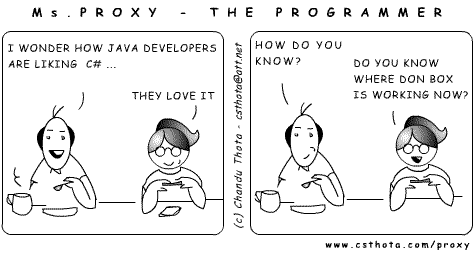
Chandu Thota
Fri 5/10/2002 10:31 AM

Friday, May 10, 2002, 12:00 AM in The Spout
Now the Fun Begins
Last night at 4:46pm, Sara Williams announced the availability of Microsoft's 4+ years of labor: the Microsoft .NET Framework, v1.0. And then, at 5:59pm, the great land rush to download the matching VS.NET bits began. Here are some links you may find interesting as you move to the RTM of .NET and VS.NET:
Here are some fun facts for you:
- The compressed VS.NET Enterprise Architect download is 1.8GB and it took my puny cable model 4+ hours to download.
- It took my laptop (574MHz, 512MB RAM) 30+ minutes to unzip.
- The resulting pre-installed folder was 2.45GB.
- The .NET runtime build number is 3705.
- The VS.NET build number is 9466.
- The codename for .NET was "Lightning" (hence the ildasm icon).
- The codename for C# was "Cool" (hence the "C# is Cool" t-shirt).
- Mike
Woodring's most excellent
asmstats
tool reveals the following:
Done processing c:\windows\microsoft.net\Framework\v1.0.3705.
Processed 69 assemblies comprising 70 modules.
Types: 8,866 (of any kind)
Classes: 5,602 (2,183 public)
Attributes: 297 (257 public)
Delegates: 334 (213 public)
Interfaces: 983 (659 public)
Enums: 1,085 (710 public)
Value types: 565 (121 public)
Members: 414,990 (of any kind, instance and static)
Methods: 281,630 instance, 12,797 static
Events: 13,160 instance, 24 static
Properties: 44,689 instance, 1,233 static
Fields: 28,478 instance, 32,979 static
Congrats to the Microsoft .NET team for a job well done!
Thursday, May 9, 2002, 12:00 AM in The Spout
For the Love of the Story
It's only happened a few times in my entire life, but I want it to happen more. It's that feeling you get when you're telling a story, trying to describe a scene or a technology or a something and, suddenly, without warning, it starts to tell you. It happened twice in college in a creative writing assignment: one of those times it actually gripped me from the moment I started writing my life story on a 3x5 card (I remember it started "I was an accident." : ). It happened once while writing ATL Internals: Chapter 7, Collections and Enumerations. And it just happened again while finishing up a writer's journal entry I started yesterday:
Whack-thump-thump. Whack-thump-thump. The sound filled the first floor. Whack-thump-thump. Tom knew he wasnt supposed to play ball in the house. Whack-thump-thump. His father, watching from the kitchen, had laid down that law several times when things had gotten out of hand. Whack-thump-thump. The ball continued hitting his hand, the floor and the door in the never-never land between the kitchen and the front entry. Whack-thump-thump. Tom, at 6, seemed to be using the mesmeric sounds to enter another place, somewhere regular, somewhere safe, somewhere comfortable. He had always been able to enter that place, whether he was playing with action figures, with clay or even with ordinary items like pencils or popsicle sticks, using them in the theater taking place in his head. Whack-thump-thump. Whack-thump-thump. His father was a much more literal thinker. He was creative, but creative in an engineering/problem-solving way and he envied his sons ability to enter this world seemingly effortlessly, never getting bored when the ordinary world around him failed to offer what was safe and regular and comfortable. Whack-thump-thump. Whack-thump-thump.
I started writing this to describe what my son Tom was doing yesterday morning just before school and it turned into a look into how much I loved and admired my 6-year-old son. He's so much different than me, but just like his mother and looking at him makes me realize just how much I love my wife. That's what writing is supposed to do. It's supposed to help you reach into your self and share what you've got with others. That's what this blog is all about and I appreciate you being here to listen.
Friday, Apr 12, 2002, 12:00 AM in Tools
Giving VS.NET That XP Look
USE THIS FILE WITH CARE. It causes problems with image lists for .NET EXEs that don't also use the same manifest file.
Just drop this devenv.exe.manifest file next to devenv.exe in your VS.NET install directory and the next time you start VS.NET under XP, it'll look mostly the same! (well, maybe a little different : )
Wednesday, Apr 10, 2002, 12:00 AM in Tools
.NET CollectionGen
[Note: As of 5/5/03, the functionality of CollectionGen has been sucked into Eric Smith's CodeSmith. I asked Eric to take on these features because CodeSmith does all of what CollectionGen does and more. All new feature requests/bug reports should go his way.]
CollectionGen is a Custom Tool Add-In to VS.NET 2002 & 2003 to generate type-safe collections. As it turns out, I did almost none of the work. Jon Flanders figured out how to add a custom tool. Shawn Van Ness implemented the template for type-safe collections. I just put it together.
CollectionGen is an add-on to generate code for type-safe collections until we have templates in C# (likely) and VB (unlikely). The benefit of a type-safe collection, of course, is that you can use it without having to cast items to and from objects. Also, Shawn has been very careful to implement a collection class that is very efficient for both reference types and value types.
Once you've setup it up and defined your collections in a collection definition file in your project, you'll have type-safe collection classes generated as part of your design-process, as shown here:

Figure 1: collections.xml collection definition file

Figure 2: collections.xml and generated collection.cs implementation file

Figure 3: CollectionGen custom tool add-in associated with the collections.xml file

Figure 4: Generate type-safe collection code
Enjoy!
Also, Atif Aziz used some of my custom tool code and built a generic VS.NET code generator shim that allows you to build a code generator that plugs into VS.NET by implementing a single method.